

Select dimensions in cm, mm, inches, ml, or oz and more — whatever fits your product.


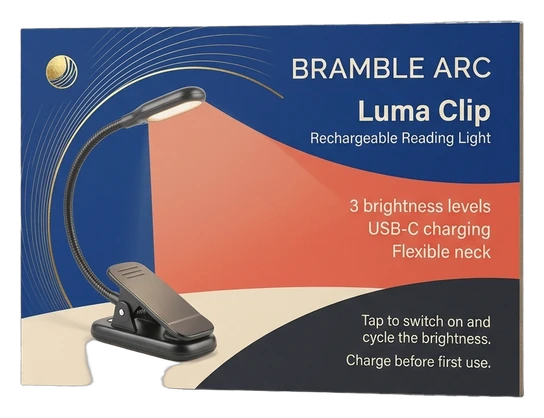
Custom product insert cards place important information directly inside your packaging, where customers can find it after opening an order. Plan the size, cardstock, artwork, instructions, QR codes, and print layout around the product and package so essential information stays organized, readable, and appropriate for the intended use.

Select dimensions in cm, mm, inches, ml, or oz and more — whatever fits your product.

Choose the Stock, printing type, and enter your order quantity.

Upload your ready artwork — or just write “Need Design” and we'll handle it.

Fill in your name, contact number, and email for quick communication.

Solve a quick captcha and hit “Submit Quote” — it takes seconds!

Our expert will reach out ASAP with the best market rate from a top packaging provider.

After You Approve the Quote — Here's What Happens Next


Product insert cards should make the next step easier for the customer. That may mean explaining how to assemble, use, clean, store, maintain, register, or learn more about a product. Before deciding on cardstock, finishes, or decorative artwork, identify the information that genuinely belongs in the package and how quickly the customer needs to understand it. The card should support the product experience without becoming a small sheet crowded with every available message.
Start by deciding what problem the insert card needs to solve. A simple product may need only a few care instructions or a QR code leading to a detailed guide. Another item may require setup steps, maintenance information, support details, a component checklist, or important usage notes. Rank the information by importance. Instructions needed before first use should not be buried beneath brand storytelling or promotional messages. Care information that affects normal maintenance should be easy to locate. Support contact details can be separated visually so customers can find them if something goes wrong. If the card also carries marketing content, keep it secondary to essential product information. A product insert can still support the brand, but the communication hierarchy should reflect what the customer needs at that moment.
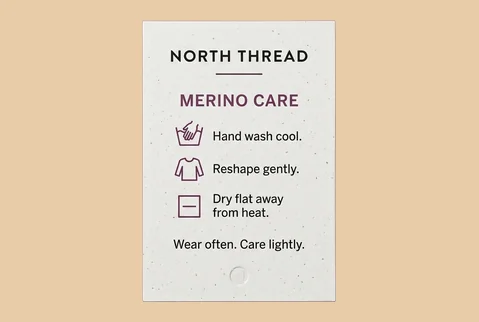
The amount of information affects the practical card size. A few short instructions may fit on a compact flat card, while longer care or setup guidance may require a larger format, front-and-back printing, multiple cards, or another supported structure. Do not solve an information problem simply by shrinking the type. Small text can make otherwise useful instructions difficult to follow. Edit unnecessary wording first, group related steps, and use clear headings, short numbered instructions, icons, or diagrams where they genuinely improve understanding. The card also has to fit the package. Measure the usable internal area after the product, inserts, protective materials, accessories, and other components are in position. If the card sits directly above the product, determine how much of the package opening it should cover. If it sits beside or underneath the product, make sure customers can locate it without unnecessary unpacking. When one insert needs to serve multiple package sizes, provide the relevant dimensions so a practical common format can be evaluated.
Good information hierarchy follows the customer's sequence. If the product must be assembled before use, setup instructions should come before maintenance guidance. If preparation, charging, washing, or another first-use step is required, place that information where it is seen before later care details. Short instructions can often be grouped into stages such as setup, use, cleaning, storage, and support. Avoid vague labels when a more direct heading tells the customer what to do. Where warnings, legally required statements, warranty conditions, safety information, regulated instructions, or other consequential content apply, those requirements should come from the responsible product owner or applicable authority. Packaging copy should not invent, shorten, or reinterpret such information simply to make the card look cleaner. Custom Boxes Inc. can plan the printed card around supplied content, but the accuracy and completeness of product-specific technical, regulatory, or safety instructions should be confirmed by the appropriate responsible party before production.
A QR code can connect a compact card to information that does not need to be printed in full. The destination might contain a setup video, detailed manual, care guide, registration page, replacement-parts information, troubleshooting resource, or another relevant page. The printed card should explain why the customer should scan the code. A QR code presented without context can leave the user guessing. Short wording such as a clear action and destination purpose can make the printed-to-digital connection easier to understand. Keep sufficient clear space around the code, avoid placing important artwork too close to it, and test the destination before artwork approval. The linked page should remain active and appropriate for the product. A digital proof can help confirm QR placement and artwork, but where scanning is operationally important, the final printed application should also be checked under realistic conditions.
Cardstock should suit how the insert will be handled and how long customers may need to keep it. A short promotional-style insert may have different requirements from a care card that users are expected to retain for months. White and natural-looking stocks produce different visual results. Coated and uncoated surfaces can also affect print appearance, feel, glare, and writability. If customers or staff need to write dates, serial information, names, notes, or other details on the card, identify that need before choosing a coating or finish. Custom Boxes Inc. reports cardstock and kraft among its supported material routes. The exact stock, caliper, coating, surface, and compatibility for Product Insert Cards should be confirmed for the selected project rather than assumed from a general material description. If durability against repeated handling is important, explain the expected use so an appropriate option can be evaluated. Do not treat a premium-looking finish as proof of durability without confirming the specific construction.
Artwork should support the instructions rather than compete with them. Use a clear hierarchy between the card title, primary steps, secondary information, illustrations, support details, QR codes, and branding. Leave sufficient margins and safe areas around critical text. When artwork extends to the edge, include the appropriate bleed in the production file. Keep small icons and diagrams large enough to remain understandable after printing. Custom Boxes Inc. reports support for AI, PDF, PSD, and EPS artwork, along with dieline or template preparation, resizing, bleed, and safe-area assistance across supported projects. Production-ready files should be used where possible, while lower-resolution references should be identified as references rather than assumed to be suitable for final printing. If diagrams, screenshots, product images, or instructional graphics are included, make sure you have the appropriate rights to use them and that they accurately represent the product being shipped.
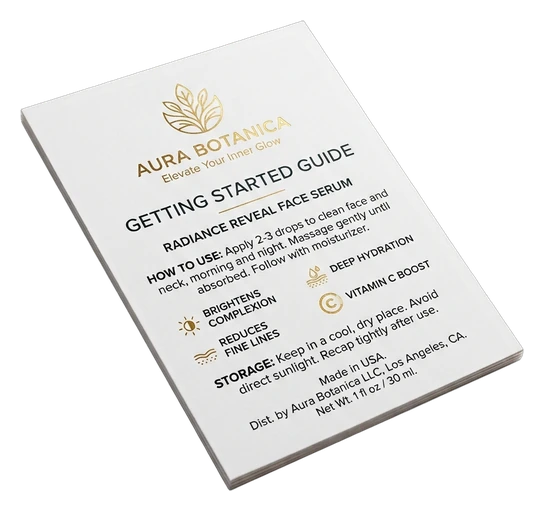
When two-sided printing is supported for the selected configuration, use each side deliberately. The front might carry the product name, first-use instructions, or quick-start information. The reverse can hold care guidance, troubleshooting, support details, a QR code, or another secondary section. Avoid duplicating the same information on both sides unless repetition serves a real purpose. The goal is to use the available space to simplify the customer's task. If one product needs several languages, versions, or regional instructions, determine whether separate artwork files are required. Mixing too much multilingual information onto one small card can reduce readability. Version planning should happen before quoting because different files and quantities can affect production setup.
Product insert programs often become more complicated when several products share similar packaging. One card may work across a family of products if the instructions are genuinely identical, but product-specific information should not be generalized simply to reduce the number of files. Create a clear version list showing the product or SKU, artwork filename, quantity, language if applicable, and any unique content. This reduces the risk of approving the wrong card for a particular item. If a QR code leads to product-specific information, verify that each version points to the correct destination. The same check applies to model numbers, care directions, compatibility details, support information, and other variable content.
Custom Boxes Inc. reports digital, offset, and flexographic printing routes, plus CMYK, PMS or spot colors, white ink on kraft, and selected finishing options across supported packaging work. The appropriate process for Product Insert Cards should be confirmed against the chosen stock, quantity, number of versions, artwork, color requirements, and finish. Decorative finishes can be considered when they support the intended presentation, but instructions should remain easy to read. Foil, lamination, embossing, debossing, or another treatment should be confirmed for compatibility with the selected stock and layout before being promised. Use the proof to review spelling, instructions, product names, artwork placement, orientation, QR destinations, version identification, and contact details. Treat the digital proof as an artwork approval tool rather than evidence of exact physical color, texture, stiffness, or finish.
Send Custom Boxes Inc. your card dimensions or package measurements, required quantity, number of products or artwork versions, cardstock preference, print requirements, finishing requests, supplied product information, QR destinations, artwork files, and delivery destination. If the card format is still undecided, explain what customers need to understand after opening the package. Complete the form, email Quotes@Customboxesinc.Com, or call +1 833-565-0363.


Answers to Help You Order with Confidence
Product insert cards can organize setup instructions, care guidance, maintenance steps, product information, support details, QR codes, warranty-related information, or other relevant customer communication. Prioritize information customers actually need to use or maintain the product. Technical, safety, regulated, or legally required content should be supplied or approved by the responsible product owner.
The appropriate size depends on the amount of information and the usable space inside the completed package. Do not rely only on the empty box dimensions because products, inserts, accessories, and protective materials can reduce available space. If the content becomes difficult to read, consider revising the layout or size rather than simply shrinking the text.
QR codes can be incorporated when the selected artwork and printing configuration reproduce them appropriately. Clearly tell customers what the code leads to, keep sufficient clear space around it, and test the final destination before approval. When scanning is important to product use, check the finished printed application as well.
Multiple artwork versions may be possible depending on the quantities, stock, printing route, and production setup. Provide a clear quantity for each product or SKU and identify each artwork file separately. This helps reduce confusion when similar products require different instructions, languages, model details, or QR destinations.
Provide the desired card size or package dimensions, total quantity, number of artwork versions, cardstock preference, printing requirements, finishes, product information, artwork files, and delivery destination. Include any requirements for QR codes, handwriting areas, multilingual versions, or retained care instructions. Unknown format decisions can then be evaluated during project planning.
Custom Boxes Inc is a leading manufacturer and supplier of custom packaging boxes tailored for every product and industry. From startups to global brands, we empower businesses across the USA with cost-effective, high-quality, fully personalized packaging solutions — crafted with precision, delivered with speed. Whether you need eco-friendly cardboard boxes, rigid luxury boxes, or branded retail-ready display packaging — we've got you covered with endless customization options, low MOQs, and lightning-fast turnarounds.